
Putting My Coding Agents in a Box: Introducing t3code-docker
This website no longer gets built on my laptop.
This morning, an agent upgraded the site's entire stack to Next.js 16, React 19 and TypeScript 7, then hunted down and fixed a scroll bug that the upgrade had introduced. It did all of that inside a Docker container, on a server, while I steered it through T3 Code. The image that container runs is one I maintain: t3code-docker. I have been building it for about two months, and at the current release, v0.27.3, it feels ready to write about.
Why agents need a machine of their own
The more I let coding agents do real work, the more my laptop felt like the wrong place for them.
- Agents are long-running. A good task can take twenty minutes. A laptop sleeps, closes, gets on a plane.
- Agents are tool hungry. Claude Code, Codex and OpenCode are three separate CLIs with three separate sign-ins. Underneath them sit language toolchains that every project wants at a different version.
- Agents have a shell. On my laptop, that shell can reach my SSH keys, my browser profiles and a decade of personal files. The blast radius is my whole digital life.
- Agents are worth checking on. Half the value of a long-running agent is starting it at my desk and reviewing its work from the couch, or from my phone in a checkout line.
None of these are edge cases. They are the daily friction of running agents locally. What I wanted was a small, boring server whose only job is to run agents, hold my checkouts, and be reachable from whatever screen I have in front of me.
T3 Code as the control surface
T3 Code is a control surface for coding agents. A server runs the agents, git and your terminals. Desktop, web and phone apps connect to it, so the thread you started at your desk is waiting for you on your phone. It is alpha software and it moves fast, but the split between server and clients is exactly right.
t3code-docker packages that server as a headless container with batteries included. One command gets you the running server plus a setup page; the agent CLIs and language toolchains install themselves on first start.
docker run -d --name t3code --restart unless-stopped \
  -p 127.0.0.1:3773:3773 -p 127.0.0.1:3774:3774 \
  -v t3-home:/home/t3 -v "$PWD/workspace:/workspace" \
  -e PUID="$(id -u)" -e PGID="$(id -g)" \
  --shm-size 1g \
  dizys/t3code-docker
Grab the setup key from the logs, open http://localhost:3774, and the setup page walks you through the rest: set a public URL, pair a device with a QR code, sign your agents in. There is a Compose file if you would rather run it as a service, and the image is published to both Docker Hub and GHCR, for amd64 and arm64.
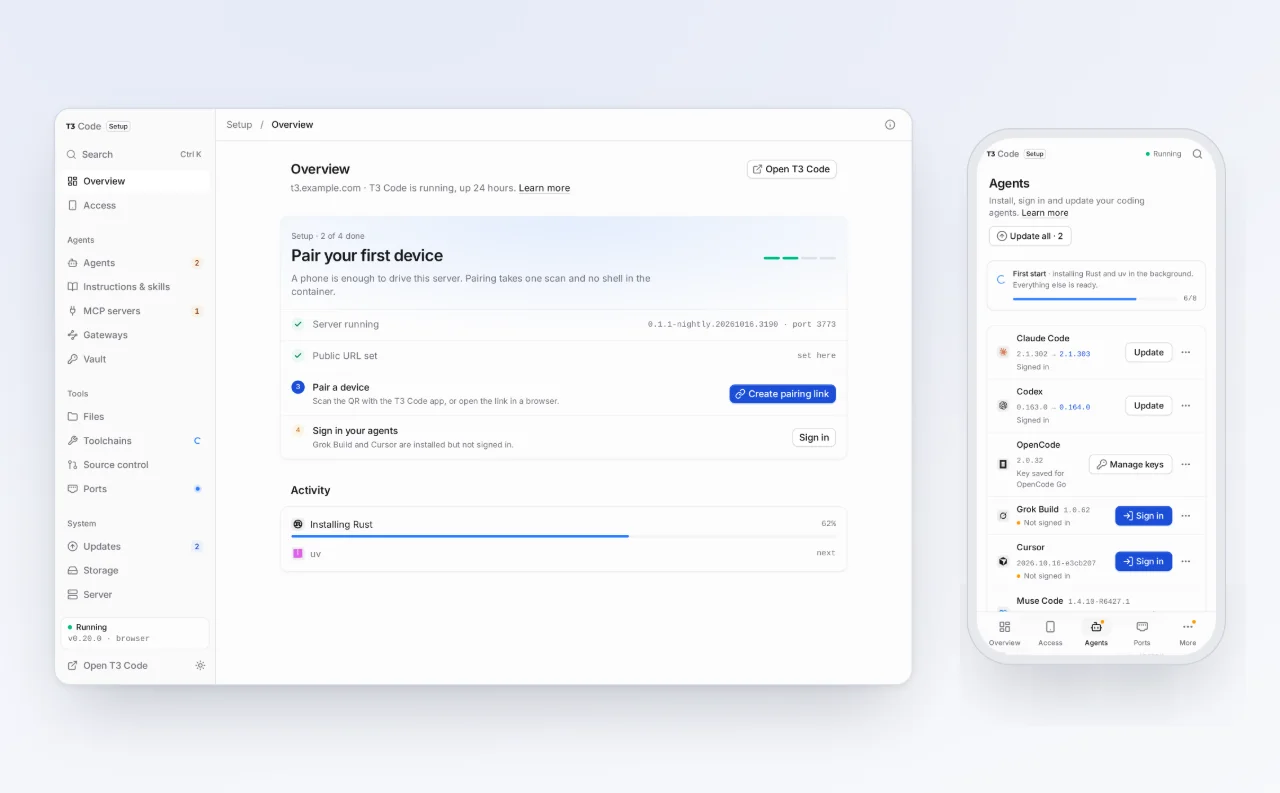
The setup page: pair a device, sign agents in, watch the first-start installs finish. No shell required.
What is in the box
- Every agent T3 Code supports. Claude Code, Codex and OpenCode install on first start. Grok, Cursor, Muse Code, Pi and Antigravity are one click away in the setup page.
- Toolchains at exact versions. Go, Rust, Bun, Deno and uv come on first start, plus about a thousand more tools through mise, per project if you want.
- Your own AI gateway. Point Claude Code, Codex, OpenCode, Pi or Grok Build at CLIProxyAPI, LiteLLM, OpenRouter or any compatible endpoint, then pick the gateway per thread in the model picker. Your direct sign-ins keep working alongside it.
- A browser for the agents. The default image ships headless Chromium with Playwright and Chrome DevTools MCP servers, so agents can look at the thing they just built. A slimmer
coreimage leaves the browser out. - Dev servers you can share. Any port can get a public https URL and a QR code, handy for checking a build on a real phone.
- Pull requests beyond GitHub.
ghis built in; the GitLab, Forgejo, Gitea and Azure DevOps CLIs install in one click. - In-place upgrades. Update T3 Code from the setup page, Stable or Nightly. A failed update rolls back on its own.
Three decisions that shaped it
Install onto the volume, not into the image
The obvious way to build this is to bake every CLI and toolchain into the Dockerfile. I went the other way: the image contains the server, the setup page and an installer. On first start, the agents and toolchains install onto the /home/t3 volume in the background, at exact pinned versions.
The trade-off is a slower first boot, a few minutes while things download. In exchange, upgrading the image becomes a non-event. Your agent versions, your Rust toolchain and your sign-ins live on the volume and survive every docker compose pull. The image stays generic, your environment stays yours, and neither has to wait for the other to be rebuilt.
The container is the security boundary
Let me be blunt about the threat model, because too many agent setups are not. An agent with a shell in this container can run anything it wants inside the container. There is no second wall, and I have not pretended otherwise.
So the defaults assume the container is the boundary. Both ports bind to localhost until you choose a proper way in: a tunnel, Tailscale, or the Caddy HTTPS sidecar that ships in the repo. The setup key and pairing links are credentials; treat them that way. Passwordless sudo for agents is off unless you turn it on. Provider credentials live on the home volume, which deserves the same care as the home directory it effectively is. T3 Code's own permission modes still apply inside, and supervised mode is the right place to start.
What the boundary buys you is that everything outside stays outside: your documents, your SSH keys, your browser sessions. The worst day an agent can have is contained to a box you can delete and recreate.
No shell required
Almost everything people usually do over SSH has a page in the setup UI instead: pairing, agent sign-in and updates, gateway configuration, file browsing and editing, storage cleanup, publishing ports. That is deliberate. The person administering this server is often on a phone, and a container that needs docker exec to stay healthy has failed at its one job.
The shell is still there when you want it, with helper commands like t3-doctor (what is installed, signed in and healthy), t3-pair and t3-expose. It is an escape hatch, not the interface.
The proof I care about: dogfooding
The strongest argument I can make is that you are looking at the output. This website's Next.js 16 upgrade this morning, the scroll fix that followed it, and the first draft of this post were all produced by an agent running in t3code-docker, in a checkout on its workspace volume. When the container has a sharp edge, I find it the same day, usually mid-task. That is a better feedback loop than any test suite I could write for it.
Try it
The repo is at github.com/dizys/t3code-docker, MIT licensed, with guides for the setup page, gateways, toolchains, reaching the server from a phone and a full configuration reference. Issues and pull requests are welcome.
One honest caveat: T3 Code is alpha and changes weekly, and this image chases it. Expect the occasional rough edge. Expect it fixed quickly, because I am probably hitting it too.
Closing
Coding agents stopped being a chat window a while ago. They run processes, hold state, keep credentials and work for long stretches without supervision. That makes them servers, and servers want a home that is not the laptop you also carry to the coffee shop. Mine live in a container now, and I do not miss the old setup at all.
Thanks to the T3 Code team for building the server worth packaging.